


All blogs
Share
Published on 10 July, 2026
NEET PG 2026 Documents Required: Registration Guide & Upload Specifications
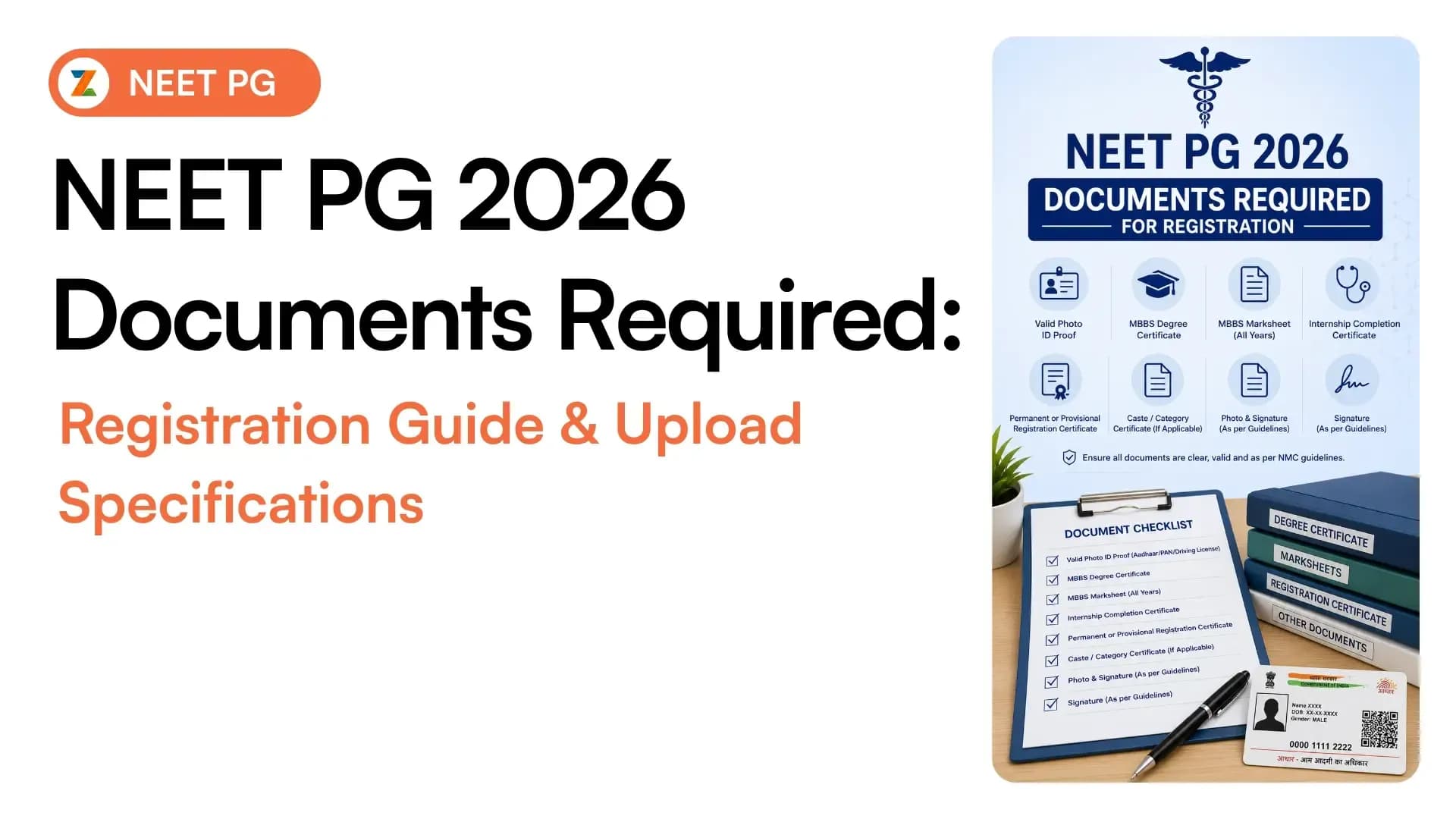
Table of contents
- What Documents Are Required for NEET PG Registration?
- NEET PG Documents Required for Registration 2026: Highlights
- Detailed List of Documents Required
- Address Proof Documents
- Documents Upload Specification
- How to Prepare Your Documents Before NEET PG Registration
- Common Mistakes Candidates Make While Uploading NEET PG Documents
- NEET PG Registration Documents vs NEET PG Counselling Documents
- Quick Checklist of NEET PG Documents
The candidates are advised to keep all the mandatory documents ready in the prescribed format before filling the NEET PG 2026 application form. Incomplete information, wrong image details or missing documents might lead to delays in your application or rejection during scrutiny.
This guide has a complete list of NEET PG documents required for registration, specifications of uploading them, preparation tips, common mistakes and how registration documents are different from counselling documents.
What Documents Are Required for NEET PG Registration?
The candidates applying for NEET PG 2026 must keep the following documents ready before going for the online registration:
Recent passport-size photograph
Signature
Left thumb impression
MBBS Degree Certificate or Provisional Pass Certificate
Permanent or Provisional Medical Registration Certificate
Valid Photo ID proof
Correspondence Address proof
Category/PwBD certificate
Internship completion details
Getting these documents ready ahead of time speeds up the registration process and helps avoid last-minute mistakes
NEET PG Documents Required for Registration 2026: Highlights
Check the important details about the NEET PG 2026 documents required for registration at a glance. This table gives you a quick overview of the documents you need before filling out the application form.
Particulars | Details |
|---|---|
Conducting Body | NBEMS |
Mode of Registration | Online |
Documents to Upload | Photograph, Signature, Thumb Impression, Certificates, ID Proof |
Image Format | JPEG/JPG (as specified by NBEMS) |
Document Verification | Online during application scrutiny |
Editable During Correction Window | Only selected fields as permitted by NBEMS |
Official Source | NEET PG 2026 Information Bulletin |
Detailed List of Documents Required
Keep the following documents ready before starting your NEET PG 2026 registration. Each document should be uploaded with a file size between 100 KB and 1 MB.
Academic Qualifications: You must possess an MBBS degree or Provisional MBBS Pass Certificate recognised under the NMC Act, 2019.
Medical Registration: A Permanent or Provisional registration certificate of your MBBS qualification issued by the NMC, MCI, or a State Medical Council is mandatory.
Correspondence Address Proof: To select your first preferred test state, you must provide a valid Correspondence Address proof, such as a Passport, Voter ID, or a signed letter from a recognised institution.
Address Proof Documents
Candidates must upload any one of the following documents as valid proof of their correspondence address.
Government Photo ID/ Address Proof:
Aadhaar Card (with address)
Voter ID (EPIC)
Passport
Driving License
Ration Card
Domicile / Residence / Permanent Resident Certificate issued by the competent state authority
Medical-profession documents:
State Medical Council (SMC) Registration Certificate
MBBS Degree / Provisional Degree Certificate from a State university / medical college
Internship Completion Certificate from the medical college
Appointment / Posting / Joining Order as Medical Officer (Govt or institutional)
Service Certificate / NOC from employer stating place of posting
Hospital / Institution Employee ID Card
Latest Salary Slip showing employer's address
Supporting / residence documents
Recent utility bill — electricity / water / landline / piped gas (within last 3 months)
Bank passbook or statement showing address
Registered Rent / Lease Agreement
Post Office account statement / India Post address card
Police tenant / residence verification certificate issued by local police
Letter from the landlord + landlord's electricity/property-tax document as backing
Hostel / PG / accommodation allotment letter from the institution or warden's certificate Property Tax receipt
Hostel / PG / accommodation allotment letter from the institution or warden's certificate
Allotment letter of Govt/institutional accommodation (not older than 3 years)
Notarised affidavit / self-declaration of residence on stamp paper
Address certificate on letterhead with photo issued by an MP / MLA / MLC / Gazetted Officer / Tehsildar, or by a Village Panchayat head (rural areas)
Signed address-cum-photo letter on letterhead from a recognised bank, registered company, or educational institution
Vehicle Registration Certificate, Insurance policy, or Income-Tax assessment order showing the current address
Passport / Aadhaar of spouse or parents with same address (where co-residing)
Documents Upload Specification
Candidates must upload two types of photographs and two distinct impressions:
Real-time Photograph:
Capture a live photograph using the webcam or the built-in camera on your computer.
Wear formal attire while taking the photograph.
Sit or stand against a plain white background. Avoid cluttered or distracting backgrounds.
Ensure your face is well lit, but avoid directing bright light toward the webcam.
Make sure there are no objects or people visible in the background. Only you should appear in the photograph.
Position yourself so that your full face, ears, neck, and shoulders are visible in a front-facing view. Keep a neutral expression, do not smile, and look directly at the camera with your eyes open.
Ensure that no part of your body below the shoulders is visible in the image.
Once properly positioned, click the "Capture Photo" button in the application form to take the photograph.
Recent Passport Photograph:
Prefer uploading a recent colour photograph taken within the last 3 months to minimise the chances of rejection.
Wear formal attire while taking the photograph.
Use a high-resolution digital camera or smartphone to capture the photo in bright, even lighting.
Avoid taking a selfie. Ask someone else to take the photograph for you.
Do not wear spectacles, caps, goggles, a stethoscope around your neck, heavy makeup, or ornaments, as these may affect image verification.
Sit or stand against a plain white background. Avoid cluttered or distracting backgrounds.
Ensure there are no objects or other people visible in the background. Only you should appear in the photograph. Images containing background objects or additional people may be rejected.
Position yourself facing the camera so that your full face, ears, neck, and shoulders are clearly visible. Keep a neutral expression, avoid smiling, and look directly into the camera with your eyes open.
Ensure that no part of your body below the shoulders is visible in the image. Photographs showing body parts below the shoulders may be rejected.
The image must be uploaded in JPG/JPEG format with a file size of 50 KB to 80 KB.
Scanned Signature:
Draw a box measuring 1.5 cm (height) × 3.5 cm (width) on a plain white sheet and sign neatly within the box using a black or dark blue ink pen.
Capture a clear image of the signature in bright, natural lighting using a digital device, preferably with a camera resolution of more than 5 megapixels. Avoid using the flash.
Ensure that the shadow of your hand, camera, or smartphone does not fall on the signature while capturing the image.
The image should have a minimum resolution of 200 DPI and a file size of 50 KB to 80 KB.
Thumb Impression:
Draw a box measuring 1.5 cm (height) × 3.5 cm (width) on a plain white sheet.
Use a fresh blue or black ink pad to take the thumb impression.
Wash and dry your hands thoroughly before taking the impression to ensure a clear print.
Press your left thumb firmly onto the ink pad and place a horizontal thumb impression neatly within the box.
The image should be uploaded in JPG/JPEG format with a minimum resolution of 200 DPI and a file size of 50 KB to 80 KB.
How to Prepare Your Documents Before NEET PG Registration
Preparing your documents in advance can help you complete the application smoothly and avoid upload errors. Follow these simple steps to ensure your files meet the required specifications.
Scan Early: Ensure all documents are scanned at 200 dpi to maintain clarity while staying under size limits
Verify Aadhaar: Ensure your Aadhaar biometric authentication is not locked; otherwise, you will face difficulties during the mandatory identity verification
Check Names: Ensure the name on your photo ID matches exactly with your primary medical qualification certificate. If your name has changed (e.g., due to marriage), keep legal proof like a Marriage Certificate or Gazette notification ready
Tech Readiness: Use a latest internet browser on a computer rather than a mobile phone for the application process
Common Mistakes Candidates Make While Uploading NEET PG Documents
Even small mistakes while uploading documents can lead to application delays or image rejection. Review these common errors to ensure your documents meet the required specifications before submission.
Using Old Photos: Uploading a photograph older than three months or one that differs significantly from your real-time appearance can lead to rejection
Improper Backgrounds: Selfies or photos with dark or distracting backgrounds are strictly prohibited
Sharing Credentials: NBEMS strongly cautions against sharing login details, OTPs, or sensitive documents with third-party agencies or coaching institutes
Payment Errors: Assuming a "pending" payment is successful, your application is only complete when the status reflects "S" (Successful) in the application PDF
Ignoring the Edit Window: Failing to rectify deficient images during the "Selective Edit Window" will result in you being declared ineligible to receive an admit card
NEET PG Registration Documents vs NEET PG Counselling Documents
The documents required for registration and counselling are not the same. Use the table below to understand which documents are needed at each stage of the admission process.
NEET PG Registration Documents | NEET PG Counselling Documents |
|---|---|
Scanned copies uploaded online | Original documents required for verification |
Used for application screening | Used during admission verification |
Photograph, signature, certificates | All academic certificates, internship certificate, scorecard, allotment letter, ID proofs, category certificates, and other counselling documents |
Digital verification | Physical or online document verification depending on counselling authority |
Quick Checklist of NEET PG Documents
Before clicking "Submit", ensure you have:
Passport-size photograph
Signature
Left thumb impression
MBBS Degree/Provisional Certificate
Medical Registration Certificate
Valid Photo ID
Address proof
Stable internet connection
Application fee payment method
_11zon.webp)
Frequently Asked Questions
Here are some answers to questions you might be looking for.
Related Blogs
Tamil Nadu NEET PG 2026 Counselling Documents Required: Complete Checklist for All Quotas
Candidates preparing for Tamil Nadu NEET PG 2026 counselling should keep all the required certificates and documents ready before completing the counselling application. The Tamil Nadu Selection Committee, Directorate of Medical Education and Research, Chennai, has notified candidates that counselling for PG MD, MS, Diploma and DNB courses for the 2026-27 session will commence shortly.
Oct 13, 2026
NEET PG NRI Quota: Eligibility, Documents, Sponsor Requirements, Sponsorship Certificate & Registration
Getting an NRI seat in NEET PG is not simply a matter of having a relative working abroad. Candidates must establish the NRI status of the candidate or sponsor, prove the required relationship, submit financial sponsorship documents and, where required, obtain an NRI certificate from the Indian Embassy or Consulate.
Sep 10, 2026
NEET PG 2026 Round 1 Reporting: Dates, Process, Documents and Rules
NEET PG Round 1 reporting is the process through which candidates complete the required admission formalities after receiving a postgraduate medical seat allotment.
Oct 29, 2026
NEET PG 2026 Counselling Seat Matrix: PDF, College-Wise, Course-Wise & Category-Wise Seats
The NEET PG counselling 2026 seat matrix is one of the most important documents for candidates preparing their choice-filling strategy. It shows the postgraduate courses and the number of seats available across medical colleges and institutions for the academic year 2026-27.
Oct 1, 2026
What After NEET PG Result 2026? Know the Next Steps
So, what to do after the NEET PG result? First, check your result and scorecard, understand your rank and qualifying status, confirm your counselling eligibility, and start preparing your documents and choice list. You should also keep track of the official counselling portals because registration, choice filling, seat allotment and reporting happen within specific deadlines.
Sep 24, 2026
NEET PG 2026 Scorecard: Download Link, Release Date, Cutoff, Details & More
The NEET PG scorecard 2026 is the individual result document issued by the National Board of Examinations in Medical Sciences (NBEMS) for candidates who appeared in NEET PG 2026. NBEMS declared the NEET PG 2026 result on September 24, 2026, while individual scorecards can be downloaded from the NBEMS website on or after October 1, 2026.
Oct 1, 2026